Catch it before
it clips.
Overset checks game translations where they already live, in the developer’s shared spreadsheet or the game’s own language files: glossary drift, broken placeholders, text that overflows its panel, and builds that change under you.
- ChromeSoon
- EdgeSoon
- FirefoxSoon
Free · No account · Projects stay in your browser
- UI box overflow
- Character limits
- Line limits
- Missing glyphs
- Placeholders
- Colour codes
- Rich-text tags
- Forbidden renderings
- Glossary terms
- Do-not-translate names
- Numbers
- Line breaks
- Locale-correct capitals
- Inconsistent translations
- Duplicate keys
- File-breaking characters
- Leading and trailing spaces
- Subtitle reading speed
- Language typography
See where your text clips, before players do.
Every translation is measured inside its real UI box. Turkish that fits in English but spills out of a VR panel shows up drawn exactly where it overflows, with character and line limits and missing letters in the font flagged beside it. Try it — this one runs right here.
Box 150 px × 1 line, 20 px Atkinson Hyperlegible.
In Overset, length limits are read from your sheet, UI boxes are set up once under Fit and fonts, and the font is the one you upload from the game.
25+ checks built for game text.
Placeholders, colour codes, glossary terms and forbidden renderings are marked in the editor itself, the moment the problem exists. Every issue also lands in one list, worst first, and most of them fix in a click.
Fit
- UI box overflow
- Line limits
- Character limits
- Missing glyphs in the font
Code & markup
- Placeholders: %name%, {0}, %s
- Colour codes
- Rich-text tags
- Characters that would break the file
- Duplicate keys
Terminology
- Glossary terms, inflection included
- Forbidden renderings
- Do-not-translate names
- Inconsistent translations across files
Text
- Missing numbers
- Line breaks
- Capitals, with locale-correct casing
- Leading and trailing spaces
- Language typography
- Subtitle reading speed
…and more, with ignore and restore on every one.
Demonstration: Overset flags “Alev Kılıcı” as a forbidden rendering of “Fire Sword” and offers “Ateş Kılıcı”, then flags a broken %hp% placeholder that F9 repairs.
- Kılıçswordsame term
- Kılıcıç softens to c before a vowelthe sword (object)same term
- Kılıçlarıthe swordssame term
A glossary that knows grammar.
Approved terms are checked in every file and every string, with inflection in mind. In Turkish, Kılıç, Kılıcı and Kılıçları all count as the same term — so a translator who used the right word with the right suffix isn’t buried in false alarms, and one who used the wrong word still gets caught.
Forbidden renderings
A rendering you've ruled out is an error everywhere it appears, with the approved term offered as the fix.
Do-not-translate names
Studio, character and place names are protected, so a translated or misspelled name gets caught.
Suggestions and a matrix
Overset suggests terms from your text, and a term-by-file matrix shows where each one is used and where it drifted.
Each language’s own rules, not just Turkish’s.
Overset knows the languages Steam supports, plus Hebrew, Hindi, Malay and Azerbaijani: their scripts and writing direction, quotation marks, punctuation spacing, decimal separators and how their text wraps. It finds them in sheet headers, file names and the text itself, and checks each one by its own rules.
German
Deutsch„Spiel beenden“Quotation marks„…“ instead of straight quotes, with a one-click fix.
French
Français« Quitter le jeu » !Quotes and no-break spaces« … » with its spaces, and a no-break space before ; : ! and ?
Spanish
Español¿Salir del juego?Opening marks¿ and ¡ opening a question or exclamation.
Chinese · Japanese
中文 · 日本語ゲームを終了しますか?Full-width punctuationFull-width marks, 。 and ? count as endings, text is counted in characters and wraps between them, never starting a line on closing punctuation.
Greek
ΕλληνικάΘέλεις να βγεις;The Greek question mark; ends a question, and Overset knows it is not a stray semicolon.
Arabic
العربيةهل تريد الخروج؟Arabic punctuation؟ is the question mark; writing direction is part of each language’s rules.
Thai
ไทยออกจากเกมWord wrappingWraps between words, and sentences may end without a full stop, ? or !.
Russian · Japanese · …
РусскийQuit game → Выйти из игрыEnglish left behindFlags English that was left in a non-Latin translation.
Sheet headers in English, in the language itself, as ISO codes or as Steam codes like schinese and latam; file names; and, when neither says, the text. A first-run picker pre-selects your languages from your browser.
- 42/42
- test headers
- 30/30
- test languages by text
New build? See exactly what changed.
Load the new English files, or sync the sheet, and get every added, changed, renamed and removed key, one by one. When a balance patch only moves numbers, your translation is updated to match — as a draft, for you to confirm. Edits other translators made in the sheet are kept apart from real conflicts.
- new
- 10new
- changed
- 2changed
- renamed
- 1renamed
- removed
- 1removed
10 new strings, 2 changed, 1 renamed, 1 removed, 39 unchanged, and new files: dlc_1.lang (7).
Restores 2540 health.
Turkish, updated as a draft: 2540 can yeniler.
GameProgress saved.
Current Turkish: Oyun kaydedildi.
NEW: SUNKEN HALLS
Works beside the sheet you already share.
Game text already lives in the developer’s spreadsheet. Overset rides alongside it, so there is no new platform for anyone on the team to adopt — and nothing for the developer to install.
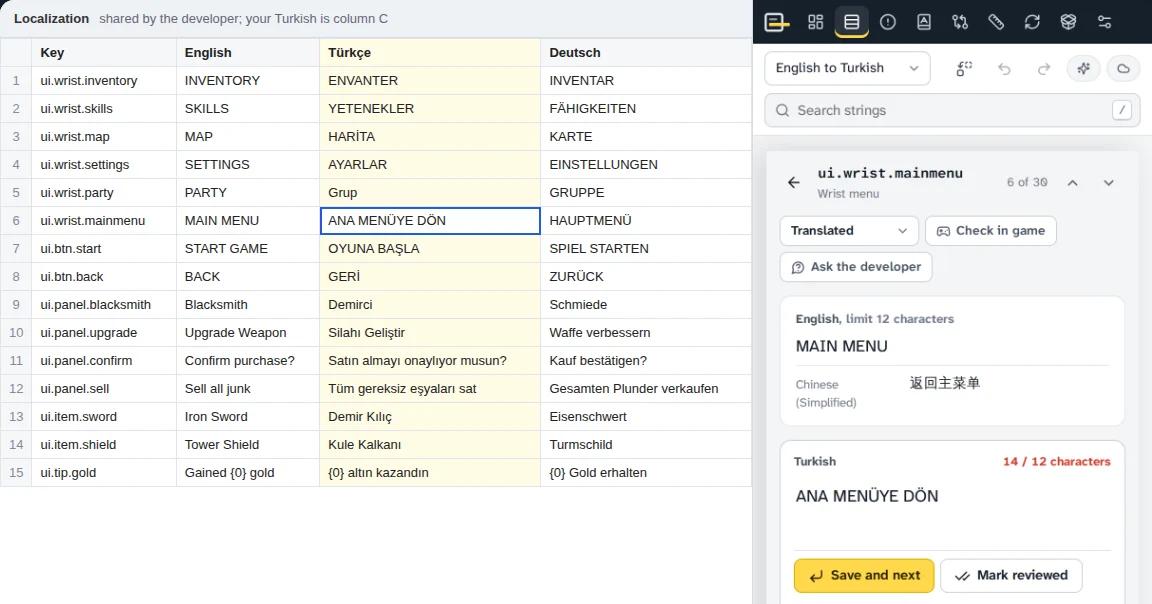
Your own sign-in
The side panel reads the Google Sheet you have open, as CSV, with the session you’re already signed in with. No sharing settings to change.
It follows your cursor
Click a cell and that string’s checks, glossary terms and fit appear. Type in the cell and the checks follow your typing.
It writes only when you tell it to
Out of the box it only reads. Paste changes back yourself, with a warning if the sync is stale or a paste would empty a cell — or connect Google and write just your changed cells, each re-read first so nobody’s edit is overwritten.
Out of the panel, into the workflow.
Every connection is optional. Each asks your browser for permission to reach that service the first time you use it, and the token or key you add stays in your browser — never in project files or backups.
Google Sheets
Write backWrite your changed cells straight to the sheet. Each cell is read again just before writing, and values go in as plain text, never formulas. Also reads the developer’s cell notes into the editor.
Game folder
Chrome and EdgeStart from the install or mod folder (languages and fonts found for you), update after a patch, and write your translation into the game with a backup of every file it replaces.
GitHub
Pull requestsSign in with a short code, pick a repository from a list, pull the latest English, and submit your translation as a pull request — from a fork when you can’t push. Open issues for questions and problems.
Crowdin and Weblate
Import and pushImport strings, plurals, limits, context and translations from hosted or self-hosted projects, and push back only what you changed. Problems post to Crowdin as issues on the string.
DeepL
DraftsDraft translations with placeholders and line breaks protected and your glossary sent along, or as a pre-translate option for strings with no memory match. Off in confidential projects.
Discord
ProgressPost progress, release notes and developer questions to a channel webhook you add, without pinging anyone.
3 cells changed in your Turkish column. Each is read again before writing.
- ui.wrist.mainmenu C6writtenANA MENÜ
- ui.btn.start C7skippedSomeone changed this since your last sync: “OYUNU BAŞLAT”Yours: OYUNA BAŞLA
- ui.btn.back C8writtenGERİ
A demonstration of the 1.3 write-back flow, with sample strings.
15 formats in. The same structure out.
Drop in the English files and your translations — folders work too. Overset pairs them up by key, and exports each file in the structure it arrived in, with your text in it.
- .langHammerwatch-style
- strings.xmlAndroid
- .inikey=value .lang / .ini
- .propertieskey=value
- .jsonnested, i18next, messages.json
- .pogettext
- .xliffincl. sdlxliff, mqxliff
- .ymlParadox
- .rpyRen’Py translations
- .resx.NET resources
- .stringsApple
- .srtsubtitles
- .vttsubtitles
- .xlsxspreadsheets
- .csvand .tsv, or pasted from Sheets
The same file, back
Exports keep each file’s original structure, so the build picks it up untouched.
XLIFF, TMX and TBX
For Trados, memoQ and Phrase, when the job continues in a CAT tool.
Bilingual Excel
For reviewers who want source and target side by side.
Reports
QA for one language or all, review changes, developer questions, a word-count quote with memory matches, release notes.
Help that fits the box, off when it has to be.
Add your own Anthropic API key in the extension and Claude can translate with your glossary and memory as context, shorten a line until it fits, review a translation, or check English that was itself translated against the original.
Your key stays in your browser and goes only to Anthropic. Each project has a Confidential switch for NDA work, which turns off DeepL too — try it on the right.
- —
- —
- —
Keyboard first, tested on real projects.
- Strings in the largest test project
- 3,552
- strings in one test project
- Segments in the largest test memory
- 30,000
- segments in one test memory
- Translation memory from the project, removed strings, and imported TMX or Excel
- Fuzzy matches, adapted automatically to the new numbers and terms
- Pre-translation and auto-fill of repeated strings
- Undo and redo, and it resumes where you left off
- Tooltips on every icon button with its shortcut; dialogs keep focus inside and close with Escape
- Stringsui.wrist.mainmenuMAIN MENU · ANA MENÜYE DÖN
- ui.btn.startSTART GAME · OYUNA BAŞLA
- item.potion.descRestores %hp% health.
- Go toOverview
- Strings
- Issues
- Glossary
- Consistency
- Fit and fonts
- Sheet sync
- Export
- Settings
- SwitchLanguage: Turkish
- Language: German
- Project: Iron Vigil VR
- ActionsFind and replaceCtrl H
- Back up this project
- Connections
- Switch theme
- Help and shortcuts?
Search strings by key, English or translation; go to any screen; switch language or project; find and replace, back up, connections, theme, help.
- Ctrl+Enter
- Save, go to the next string that needs work
- Ctrl+Shift+Enter
- Mark reviewed, go to the next
- Ctrl+K
- Command menu (in the editor: concordance search)
- Ctrl+H
- Find and replace
- F3
- Concordance search
- F9
- Insert the next missing placeholder or tag
- JorK
- Move through strings
- V
- Mark as read in the game
- Q
- Question for the developer
- ?
- Every shortcut
No account.
No analytics.
No server.
Projects, fonts and memories are stored in your browser. Text leaves your device only when you load a Google Sheet, start a Claude action, or use a connection you set up yourself — and the developer of Overset receives none of it.
Read the privacy policyAnyone whose words have to fit a game.
Community translators
Volunteers working in a developer’s shared sheet or a Steam Workshop mod. Free, no account, and it works in short sessions.
Professional game translators
XLIFF, TMX and TBX for your CAT tool, Crowdin and Weblate import, a word-count quote with memory matches, review reports, and a confidential mode for NDA work.
Studios and coordinators
Check every language column before a release, send each translator their QA report, post progress to Discord, and pseudo-localize before translation starts.
Overset is made by Alp Yalay, who has localized games into Turkish, including Heroes of Hammerwatch II and Battle Talent. It is built around the problems that work runs into: suffixes a plain glossary can’t see, placeholders lost in a paste, and labels that fit in English and nowhere else.
Fair questions
Something else? The support page has troubleshooting and a direct line.
Is Overset free?
Yes. There is no account and no subscription. The optional Claude features use your own Anthropic API key, so any cost for those is between you and Anthropic.
Does Overset change the developer’s sheet?
Only if you tell it to. By default it reads the sheet you have open with your own sign-in, and you paste your changes back yourself, with a warning if your sync is stale or a paste would empty a cell. If you connect Google, Overset can write just the cells you changed in your own column, after re-reading each one and checking the row’s key, and it skips any cell someone else has changed since your last sync.
Where are my projects stored?
In your browser’s own storage, on your device. Overset asks the browser to keep that storage persistent and reminds you to back up; Export → Backup saves a project file you can keep or open in another browser. Tokens and keys for connections are kept in the browser too, and are never written into project files or backups.
Which browsers does it work in?
Chrome 116 and later and Microsoft Edge, in the side panel; Firefox 128 and later, in the sidebar. The web version runs in any modern browser as a single page. Starting from and writing to a game folder works in Chrome and Edge.
Do I need Claude to use it?
No. Every check, the glossary, translation memory, build updates and exports work without it. Claude is there if you add your own API key, and each project can switch it off.
Can I use it for work under NDA?
Yes. Nothing leaves your device unless you load a Google Sheet, start a Claude action, or use a connection you set up. Turning on a project’s Confidential switch turns Claude and DeepL off for that project.
What are connections, and do I have to use them?
Connections link Overset to the tools a localization job already uses: write your changed cells to Google Sheets, work from and write into a game folder, open GitHub pull requests and issues, import from and push to Crowdin and Weblate, draft with DeepL, and post progress to Discord. They are all optional, each asks your browser for permission the first time you use it, and Overset does nothing with them until you do.
What’s different in the web version?
It is the same workspace in one page, for game files and pasted or uploaded sheets. It can’t read the Google Sheet open in another tab or follow your cursor there, it has no connections (Google write-back, GitHub, Crowdin, Weblate, DeepL, Discord or the game folder), and Claude features need the extension with your own key.
Ship every language inside its box.
Open the web version now, or add the extension when the store listings go live. This is Overset 1.5.0.
- ChromeSoon
- EdgeSoon
- FirefoxSoon